To do this, open the Control 2 software.
Go to the Apogee Control 2 menu and choose Settings.
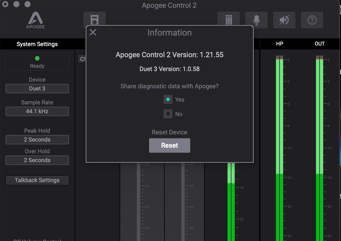
This opens a window with a reset button.
Click that reset button and confirm to load the default values to the default:
![Apogee Logo White.png]](https://knowledge.apogeedigital.com/hs-fs/hubfs/Apogee%20Logo%20White.png?height=40&name=Apogee%20Logo%20White.png)
To do this, open the Control 2 software.
Go to the Apogee Control 2 menu and choose Settings.
This opens a window with a reset button.
Click that reset button and confirm to load the default values to the default: